

Onpage Viewers Countdown
Page: Product Pages (Optimized for Conversions)
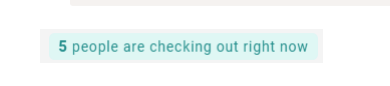
Snippet Code
<!DOCTYPE html>
<html lang="en">
<head>
 <meta charset="UTF-8">
 <meta name="viewport" content="width=device-width, initial-scale=1.0">
 <title>People Checking Out</title>
</head>
<body>
 <div id="checkout-message"><strong class="changing-number">5</strong> people are check
ing out right now</div>

 <script>
 let currentCount = 5;
 const minCount = 1;
 const maxCount = 10; // Set max limit if needed

 function updateCheckoutMessage() {
 const changeFactor = Math.random() < 0.5 ? -1 : 1;
 const changeValue = Math.floor(Math.random() * 2) + 1;

 currentCount += changeFactor * changeValue;

 if (currentCount < minCount) {

 currentCount = minCount;
 } else if (currentCount > maxCount) {
 currentCount = maxCount;
 }

 document.getElementById('checkout-message').innerHTML = `<strong class="changi
ng-number">${currentCount}</strong> people are checking out right now`;
 }

 setInterval(updateCheckoutMessage, 10000); // Update every 10 seconds
 </script>
</body>
</html>
<style>
#checkout-message {
 font-size: 13px;
 text-align: center;
 background: #dff7f4;
 border-radius: 5px;
 width: max-content;
 margin-left: auto;
 margin-right: auto;
 padding: 1px 8px;
 color: #218d8b;
 line-height: 22px;
}
.changing-number{
font-size: 14px;
font-weight: 800;
}
</style>Instructions
Heyy Guys 
Watch the video below to learn how to Import these Codes into your Shopify Ecommerce Store!