

Use Copy Code
Page: Homepage

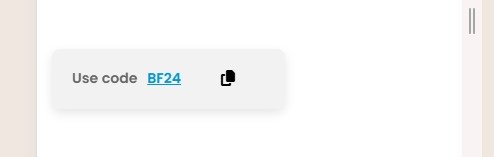
Snippet Code
<div class="discount-code-wrap" id="discountCodeWrap">
  Use code <span id="textToCopy">BF24</span>
  <button id="copyButton" aria-label="Copy code">
    <i class="fa-solid fa-copy"></i>
  </button>
</div>

<script>
  const copyButton = document.getElementById("copyButton");
  const discountWrap = document.getElementById("discountCodeWrap");
  const textToCopy = document.getElementById("textToCopy");

  copyButton.addEventListener("click", () => {
    const code = textToCopy.textContent.trim();

    // Use Clipboard API
    navigator.clipboard.writeText(code).then(() => {
      // Show "Copied!" message and add fading animation
      const copiedMessage = document.createElement("span");
      copiedMessage.classList.add("copied-message");
      copiedMessage.textContent = "Copied to clipboard!";

      // Replace button with message temporarily
      discountWrap.replaceChild(copiedMessage, copyButton);

      // Fade-out and restore button after 2 seconds
      setTimeout(() => {
        copiedMessage.style.opacity = "0";
      }, 1000);

      setTimeout(() => {
        discountWrap.replaceChild(copyButton, copiedMessage);
      }, 2000);

    }).catch((err) => {
      console.error("Failed to copy: ", err);
      alert("Failed to copy code. Please try again.");
    });
  });
</script>

<style>
  .discount-code-wrap {
    display: inline-flex;
    justify-content: center;
    align-items: center;
    gap: 10px;
    background: #f2f2f2;
    border-radius: 8px;
    padding: 10px 20px;
    font-size: 14px;
    font-weight: 600;
    color: #676767;
    transition: all 0.3s;
    box-shadow: 0 4px 10px rgba(0, 0, 0, 0.1);
  }

  .discount-code-wrap:hover {
    background: #e8f4ff;
    color: #0078d4;
  }

  #textToCopy {
    text-decoration: underline;
    color: #0098d9;
    cursor: pointer;
  }

  button#copyButton {
    border: none;
    background: transparent;
    color: #000;
    font-size: 16px;
    cursor: pointer;
    transition: color 0.3s;
  }

  button#copyButton:hover {
    color: #0078d4;
  }

  .copied-message {
    font-size: 13px;
    font-weight: bold;
    color: #0098d9;
    opacity: 1;
    transition: opacity 1s ease-out;
  }
</style>
Instructions
Heyy Guys 
Watch the video below to learn how to Import these Codes into your Shopify Ecommerce Store!